Are you in need of a reliable and user-friendly Chrome extension to record videos? Look no further! With this amazing Chrome extension, you can easily record videos from your camera or capture them directly from your screen. Whether you want to record your desktop, a specific application window, or a Chrome tab, this extension has got you covered.
No Signup Required - Free to Use
One of the best things about this Chrome extension is that it is completely free to use. Unlike other similar tools that require you to sign up for an account, this extension allows you to start recording videos right away, hassle-free. No need to provide any personal information or create an account - simply install the extension and you're good to go!
Unlimited Videos with No Watermarks
Say goodbye to limitations and watermarked videos. With this Chrome extension, you can record unlimited videos without any watermarks. Preserve the original quality of your recordings and use them for any purpose you desire, whether it's for personal or professional use.
New Features for Enhanced User Experience
This Chrome extension continuously improves to meet the needs of its users. Here are some exciting new features that have recently been added:
-
Autosave Videos and Recover Recordings:
Don't worry about losing your recordings in case of a crash. This extension now automatically saves your videos, ensuring you never lose your important moments.
-
Record Audio from Microphone and System:
Capture both audio from your microphone and system simultaneously. Perfect for creating tutorials, presentations, or any other video that requires audio commentary.
-
Seek/Skip While Playback:
Easily navigate through your recorded videos by seeking or skipping to specific sections. No more wasting time searching for the exact moment you want to revisit.
-
Record Screen and Camera:
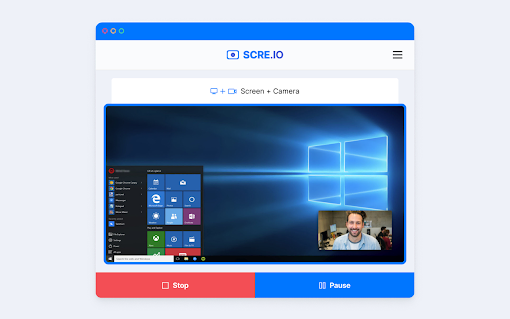
Want to include yourself in the video? This extension allows you to record both your screen and camera simultaneously. Keep an eye out for more settings related to this feature in the near future.
-
Warning for Unsaved Videos:
Never accidentally delete an unsaved video again. The extension now prompts you with a warning before permanently deleting any unsaved videos, ensuring you don't lose any important footage.
Don't just take our word for it - let's hear what other users have to say:
-
"Recording works really amazing, the only issue I have is that the optimization does not load or work at all." - A Dgr
-
"I like this extension very much. But recently, the video quality has worsened. Please add an option to record with higher quality/bit rate." - Aliaksei Piarouski
-
"This extension is good, but it's annoying that it cuts off the recording without any notification. Please fix this issue as it was working fine a few weeks ago." - Lisa Gallegos
Despite some minor issues, this Chrome extension remains a popular choice among users for its ease of use and functionality. Don't miss out on the opportunity to record high-quality videos without any limitations. Install this amazing Chrome extension today and start capturing your favorite moments with ease!




















30 Reviews For This Extension
saved file dont work alot of time, they are in webm format and most of time even format changing tools cat fix them. it plays on laptop or pc, but never phone, and god forbids sending the for someone.
Doesn't work. Just closes it self out 5 seconds into recording.
Very useful tool
What the hell! After recording 1:30 hour video and clicking stop button, it just shows black screen and I face a buggy situation! Shame . . .
its very nice and helpful but export its webm please upgrade with MP4
Great feature
Its good, worked as expected. Amazing!!
Not record in mp4 or mov, can only record in webm, which cannot jump to different times or be viewed properly for some reason, that need to re-. Record not in bad quality, totally works but very bad option, should not use this. *The file seems to be missing keyframes that caused the viewing problem. *Other comments suggested the video is just few seconds, turns out that the same cause as mentioned. Converting it to mp4 (re-encodes it) problem should solved.
Not record in mp4 or mov, can only record in webm, which cannot jump to different times or be viewed properly for some reason, that need to re-. Record not in bad quality, totally works but very bad option, should not use this. *The file seems to be missing keyframes that caused the viewing problem. *Other comments suggested the video is just few seconds, turns out that the same cause as mentioned. Converting it to mp4 (re-encodes it) problem should solved.
its good, but the recorded format is not optimized to play on all devices
Doesn't record, once I stopped recording it was not responsive.
A lightweight screen recording extension that’s easy to use and delivers solid results
Free and easy to use
ily
Best one
w extension bro it was super good ! I will rate u 5 out of 5 man
w extension bro it was super good ! I will rate u 5 out of 5 man
it good and there no lag
Screen Recoder is a reliable and easy-to-use screen recording tool. The interface is clean, and it works smoothly without unnecessary complications. It’s especially useful for quick recordings, tutorials, or sharing ideas efficiently. Overall, it delivers exactly what you need in a simple and effective way.
just installed another extension that does the same thing, and found out it only allows to record up to 5 mins to local. this one has no limit imposed. great extension! thank you!
it is the best software! Also to the people in the comments about webm, go to video converter online and make it mp4 which is not that hard.
I'm using this program daily because it works quite well as long as the duration of recording is not too long. However, if the recording is long - I don't know the exact duration. Likely a couple of hours to longer... Then the recording cannot be saved as the extension becomes unresponsive. I have lost a few recording due to this.
only saves as webm, why not another file choice???
Maxing out GoNoodle champs
Worked great until recently, I don't know if today my computer is just being particularly picky but when I hit record, and then end recording, the menu that lets me save it doesn't pop up.
It keeps me in a loop of picking which screen to record. Finally I get it to pick the right tab but there are no recording controls. I cannot see if I'm recording or not only that I'm sharing the screen. This app is pointless.
Been an awesome substitute for Screencastify when they moved to a paid system.
when you download a video from this screen recorder it also downloads loads of porn for no reason
cool
i can record good but like it says audio not found 4/5 stars recommended but bugs